#Docs
K8S at scale - Gardener step 1: sowing the seeds
Abdelfattah Hilmi
·
·
#Cloud#Devsecops#SRE
#Docs
Imagine your Kubernetes clusters as tiny gardens. Each one needs care: watering, pruning, protection from pests… and honestly, who has time for all that? That’s where Gardener by SAP steps in. Think of it as the head gardener — orchestrating, nurturing, and keeping everything alive and thriving, even when you’re off doing literally anything else.
Now, I’m usually pretty stubborn when it comes to my HomeLab stack — I like my tools tried, tested, and predictable. But every once in a while, something comes along that’s just too good to ignore. Gardener is one of those things.
Let’s dig in
Kubernetes is amazing, but managing it at scale is… let’s just say, not everyone’s idea of fun. Spin up one cluster? Easy. Spin up dozens — across multiple cloud providers, teams, or regions — while keeping upgrades, security patches, and consistency in check? That’s when things start to get messy.
This is the exact problem Gardener was born to solve: multi-cluster Kubernetes management at scale. Instead of treating clusters as pets that need hand-holding, Gardener treats them as plants — reproducible, scalable, and disposable.
Key motivations behind Gardener:
Multi-cloud native: Supports AWS, Azure, GCP, OpenStack, Alibaba Cloud, and even bare-metal.
Consistency: All your clusters, no matter the provider, are provisioned and maintained the same way.
Self-service: Teams can request and manage their own clusters without bothering ops.
Day 2 operations: Upgrades, patches, backups, monitoring — all automated.
At a high level, Gardener follows a Kubernetes-native pattern: everything is just a CRD (Custom Resource Definition). Instead of reinventing the wheel, Gardener extends Kubernetes to manage other Kubernetes clusters.
Here’s the mental model:
Garden Cluster: The “management” cluster where Gardener is installed. It hosts the central API server and controllers. This is where you define your Shoot specs.
Seed Cluster: Runs the control planes of the Shoots. Think of it as a nursery: multiple Shoots’ control planes live here, each in its own namespace.
Shoot Cluster: The actual workload cluster that you (or your dev teams) use to run applications.
Gardenlet: The worker bee of Gardener. Runs inside Seed clusters and takes care of provisioning and managing Shoot control planes, similar to how a kubelet manages pods.
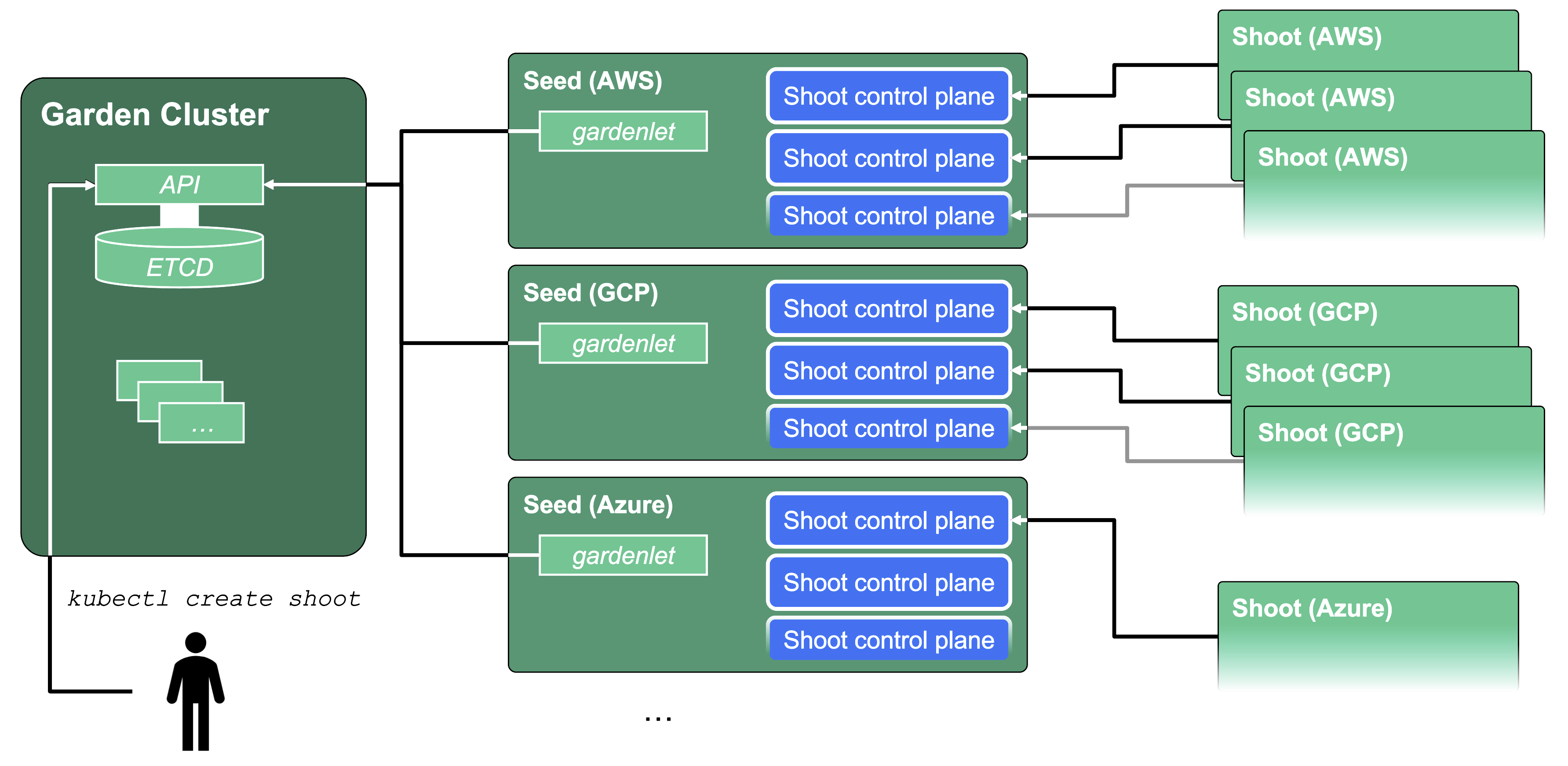
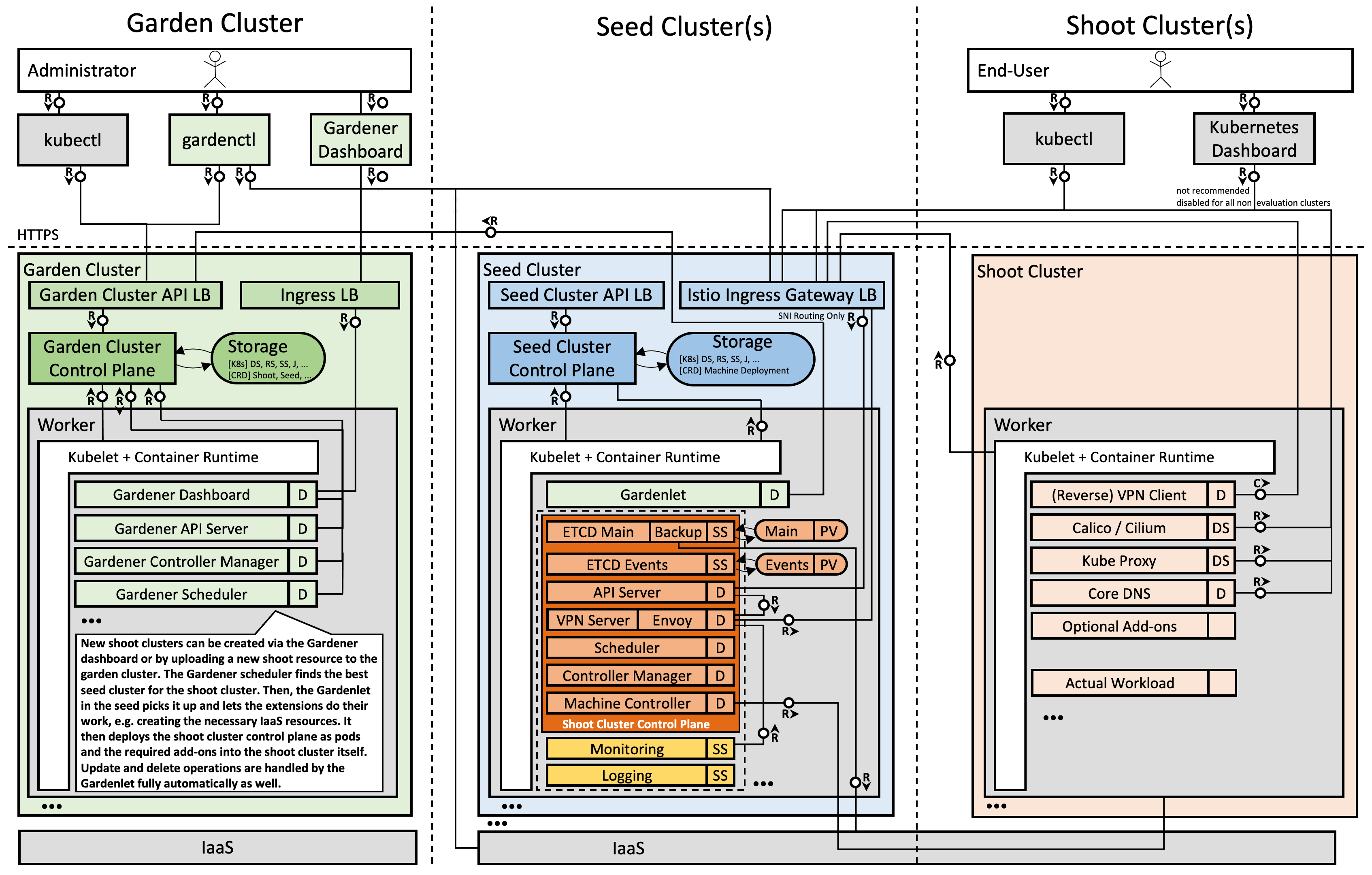
💡 Notice the recursion? Kubernetes itself is used to manage more Kubernetes clusters.
Here’s why Gardener stands out compared to other solutions:
Scalability: Runs thousands of clusters, with isolated control planes, efficiently packed on Seed clusters.
Multi-tenancy: Each Shoot has its own isolated control plane. Different teams/tenants won’t step on each other.
Cloud neutrality: Write your cluster spec once; Gardener handles the provider-specific nitty-gritty.
Security & isolation: Control planes are separated, and Gardener comes with built-in RBAC for multi-team setups.
Automation-first: Cluster lifecycle is fully automated (creation, scaling, upgrading, deletion).
Extensibility: Providers are “extensions” — you can add your own infrastructure providers if you need.
You should think about Gardener if:
You manage more than just a handful of clusters (think enterprises, SaaS providers, universities).
You need consistency across multiple clouds or hybrid setups.
You want to offer self-service Kubernetes clusters to teams without turning ops into a bottleneck.
You care about automation of Day 2 operations (upgrades, monitoring, autoscaling).
If you’re just running one or two clusters, Gardener might be overkill. But if you’re running tens or hundreds, it changes the game.
Let’s get our hands dirty and create a Shoot. First, you need a YAML file describing your desired cluster state. Then in your terminal:
kubectl apply -f example/provider-local/shoot.yaml
This tells Gardener: “Hey, make this cluster happen!”
While the cluster grows (this usually takes a few minutes), let’s peek inside the Shoot resource. Use:
kubectl explain shoot kubectl explain shoot.spec
This will show you what all the fields mean. Nerdy? Yes. Useful? Totally.
To watch the creation process:
kubectl get shoot local --watch
Sit back and watch your cluster bloom. Congratulations! 🎉 You’ve just planted your first Shoot.
Once your Shoot is alive, you’ll need a kubeconfig to talk to it. In Gardener, you can request either an admin or viewer kubeconfig. For admin access:
gardenctl target shoot local --garden local eval $(gardenctl kubectl-env bash)
Now you’re talking to your Shoot cluster. Try listing nodes:
kubectl get nodes
Or check out the kube-system pods:
kubectl get pods -n kube-system
💡 Tip: You’re now dealing with two clusters:
Garden cluster – where you manage Shoot resources.
Shoot cluster – where your apps actually run.
Switch back to the Garden cluster anytime with:
unset KUBECONFIG kubectl get shoot
In Gardener, the control plane of a Shoot lives in a Seed cluster, another Kubernetes cluster. Normally invisible to users, it runs all the boring-but-critical stuff like ETCD, API servers, controllers, and schedulers.
Check out the Seeds you have:
kubectl get seed
The magic happens thanks to the gardenlet, which manages your Shoot’s control plane in a way similar to how kubelets manage pods. Each Shoot’s control plane is isolated in its own namespace on the Seed, but shares the underlying nodes—efficient and tidy.
Want to peek inside the control plane? Select the Seed kubeconfig:
ktx runtime kubectl get pods -n shoot--local--local kubectl get deployments,statefulsets -n shoot--local--local
You’ll see the usual suspects: ETCD, API server, controller manager, scheduler, plus machine-controller-manager, cluster-autoscaler, and observability goodies.
And just like that, you’ve sown the seeds, watched them grow, and peeked behind the curtain at the garden staff doing all the heavy lifting. 🌱